

InSight MissionInSight Cameras Raw Data Product Peer Review
|
|
This page includes documentation, descriptions, and examples of the data and software included in this Peer Review, as well as the tools that can be used to view and access the data. If you require further assistance, please contact Jordan Padams.
PDS has adopted XML for PDS4. The Extensible Markup Language (XML) is an international standard that is widely used by many online data systems to document their data. It provides a standard syntax and structure for describing data for many different industries. A significant number of vendors and programming languages provide support for reading and writing XML files. XML integrates directly with web-based applications allowing for the metadata, described in XML, to be rendered in a number of different formats. See the following pages for more detailed information regarding the PDS4 standard:
The PDS4 Validate Tool is software developed by the PDS Engineering Node for validating PDS4 product labels and product data. The associated specific schema for the product label specifies syntactic and semantic constraints. The product label itself specifies the constraints for the data.
Assumes you are using a Mac OSX or Cygwin on Windows and the Validate Tool has been installed per the downloaded instructions. Also assumes you have downloaded and unpackaged the InSight Cameras Bundle to $HOME/insight_cameras.
To validate a single product against the released dictionaries and output the report to validate-report.txt:
    cd $HOME
validate insight_cameras/data/sol5226/idc_raw/d000m5226t492849479edr_f0000_0427m1.xml -f -r validate-report.txtTo validate the entire sample bundle with full integrity checking, and output the report to validate-report.txt (from within InSight bundle):
    cd $HOME/insight_cameras
    mv miscellaneous/insight_cameras_checksums.txt .
    validate . -f -i -M insight_cameras_checksums.txt -r validate-report.txt
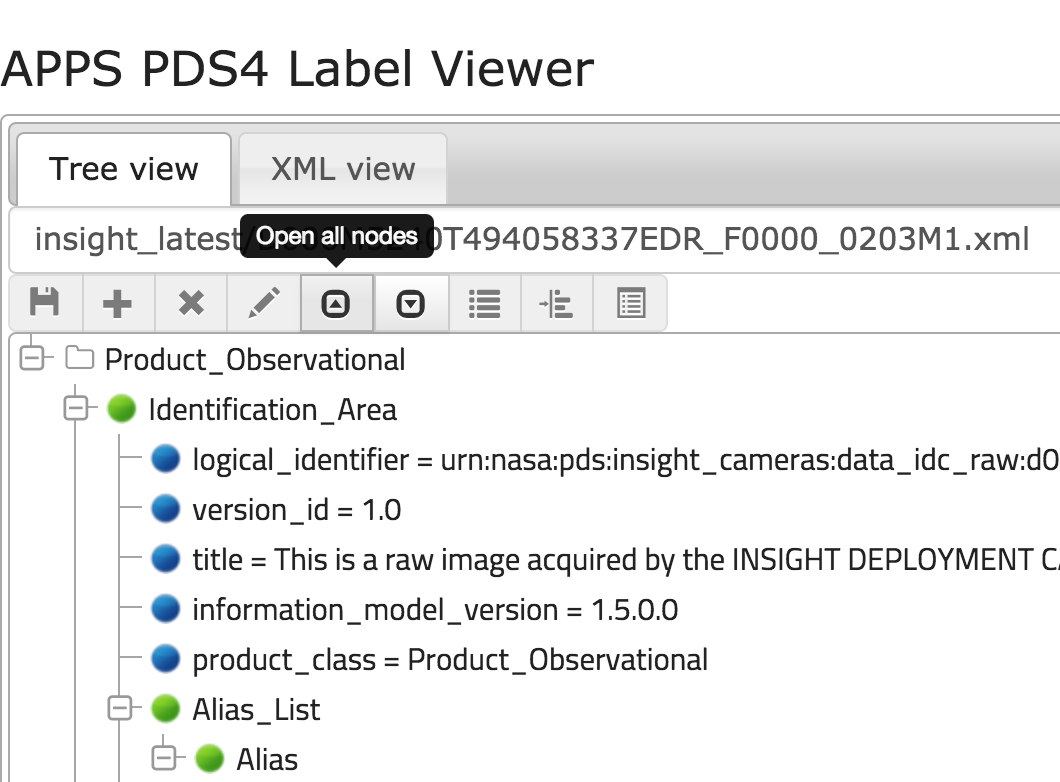
PDS4 labels use XML to describe product data. Since XML can sometimes be difficult to read, the APPS Label Viewer was developed to abstract away the XML tags, and just display the nested key-value pairs. This is a beta version of the software, available as a web service on http://pdsimg-services. Any comments or feature requests would be greatly appreciated. To view a specific product in the insight_cameras bundle, use the following URL structure to access the web service (username and password are the same as the one to access this website, username:insightreview):
Note: This is not a downloadable service and requires Internet access. See links below.
http://pdsimg-services.jpl.nasa.gov/viewer/?label=insight_cameras/path/to/pds4_label.xml
In PDS3, NASAView was used as a means of viewing the PDS3 data products. In PDS4, there is no equivalent tool to "view" the data locally. Instead there are 2 software tools available that allow the user to transform the PDS4 products into viewable formats, i.e. JPEG, PNG, TIFF, etc. The user can then open those images at their leisure. Also, as a simpler way to view the images, the InSight Cameras bundle, there is a browse collection that contains full-resolution versions of the raw data products.
Note: The ERP data products are Reference Pixel images and therefore not a visualizable product.
The browse images found in insight_cameras/browse were all generated using the MIPL Transcoder (InSight pipeline software), and are the full-resolution PNG images produced from the raw data products. The following are links to those browse products:
Developed by the PDS Engineering Node, the Transform Tool is the PDS-wide command-line tool used for transforming PDS3 and PDS4 product labels and product data into other formats. The following is an example of transforming an ICC 2D (or grayscale) image into a JPEG. Note: Currently, this software does NOT support 3D (or color) images, as in the case of many of the InSight sample products. This feature is under development and will be completed prior to the archival of InSight data.
% transform insight_cameras/data/sol5226/idc_raw/d000m5226t492849479edr_f0000_0427m1.xml -f jpg
Last updated Monday October 26, 2015 10:09 AM


